1. Choose your farms
Select the LDPlayer profiles you want to manage. Farms can keep different assigned routines.
THE CUSTOMER EXPERIENCE
Manage your Viking Rise farms through a dedicated desktop interface. Clear farm selection, visible routines and one place to understand what needs attention.
01 / CUSTOMER INTERFACE
A shared view of farm status, selected routines and recent activity. See where attention is needed before you run anything.
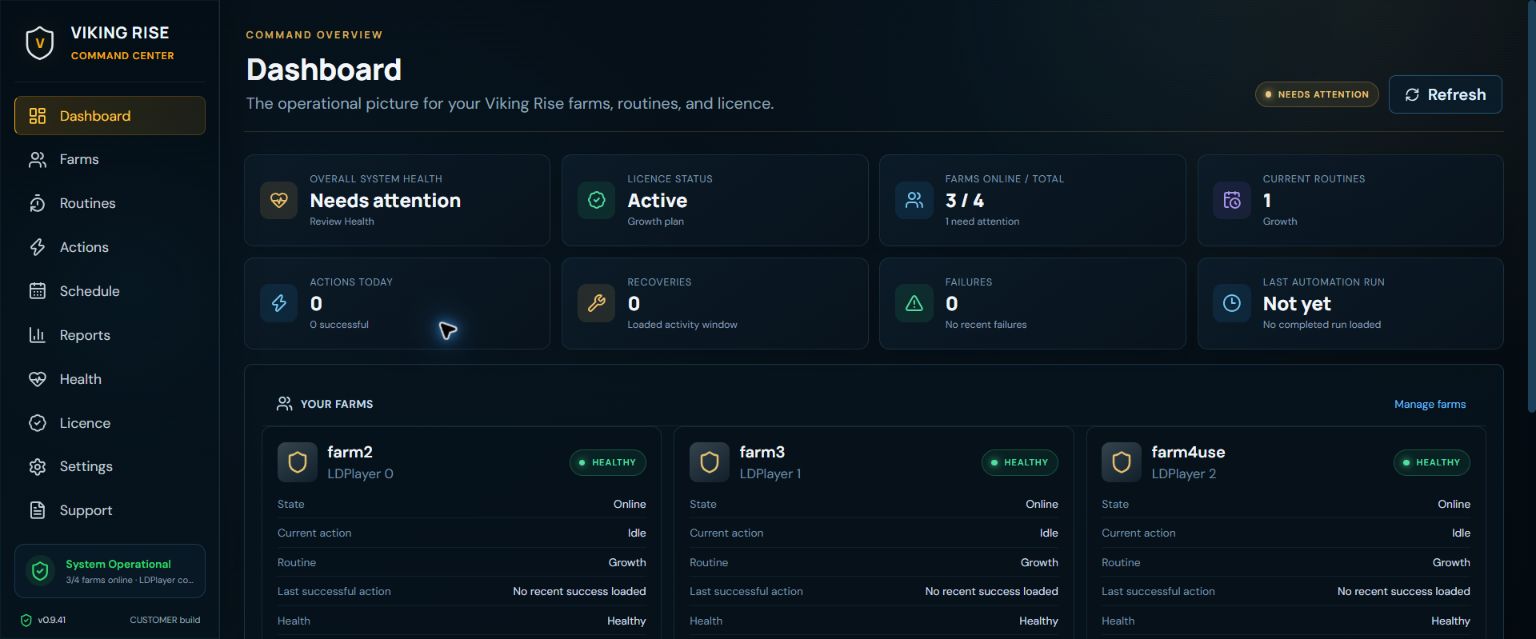
Actual development-build interface captures from September 2026. Example account state; not a live feed or proof of current automation reliability.
THE EVERYDAY FLOW
You shouldn’t need to edit scripts just to run a farm. The customer interface brings the main decisions into view.
Select the LDPlayer profiles you want to manage. Farms can keep different assigned routines.
Pick automations, arrange their order and set task preferences. Review each farm’s assignment before starting.
Start a selected farm routine or configure its cadence. Follow status and inspect errors in the same application.
ALREADY USING GNBOTS?
See how the configuration migrator helps you review what can move over.