Add your farms
VRA works with your existing LDPlayer profiles on a Windows PC. Each farm stays identifiable in one command centre.
HOW THE FARM AUTOMATION WORKS
VRA is a Windows application that runs the tasks you choose inside your existing Viking Rise LDPlayer profiles. It opens a farm, reads the current game state, performs the next configured action, checks the result and makes anything uncertain visible.
You choose which farms run, what each one should do and when. VRA handles the repeated navigation and actions, then reports the outcome instead of treating every click as success.
01 / SET IT UP YOUR WAY
There is no universal routine. A player sets the intent; VRA handles the repeatable work within those choices.
VRA works with your existing LDPlayer profiles on a Windows PC. Each farm stays identifiable in one command centre.
Choose the jobs that farm should run, their order and supported limits. A resource farm does not need the same routine as your main account.
Start selected farms manually or give their routine a cadence. A concurrency limit controls how many emulator instances your PC handles together.
02 / ONE FARM, ONE RUN
A routine is a sequence of bounded tasks—not one endless macro. Here is the practical flow without exposing the implementation underneath.
VRA launches or connects to its assigned LDPlayer profile and waits for Viking Rise to reach a recognisable state.
Before a task acts, it checks the current screen and relevant prerequisites. A completed queue, an active queue and an unavailable feature are not treated as the same result.
The routine works through the configured sequence—such as rewards, research, troop care or gathering—using the controls available in that moment.
Closing a menu is not enough. The workflow looks for the expected state change and records the result for that step.
Recognised interruptions can be cleared within limits. If the outcome remains uncertain, VRA pauses that work rather than blindly repeating a spend or dispatch.
EXAMPLE FARM ROUTINE
Only configured, eligible actions should run. Locked features, missing resources and active queues can legitimately produce a skipped or unavailable result.
03 / WHAT MAKES VRA DIFFERENT
The difference is not a secret list of coordinates. It is how the product is being shaped around one game, multiple farms and outcomes you can inspect.
The product is being built around Viking Rise farm workflows—not as a generic recorder or a bundle of unrelated bots.
You decide task order, preferences, limits, schedules and concurrency. The software does not decide your account strategy for you.
Farm status, step results and failure captures are designed to show what happened and where attention is needed.
The configuration migrator can preview recognised profiles and supported settings without copying GnBots software, licences or credentials.
The desktop app operates your own LDPlayer environment. Your hardware determines practical emulator capacity.
The engineering goal is safer recovery and clearer outcomes—not a promise of perfect runs, ban protection or a finished release today.
THE CUSTOMER SIDE
The command centre brings farm selection, routines, schedules, environment checks and outcomes together. These are real development-build captures—not a fictional mock-up.
Tour the customer interface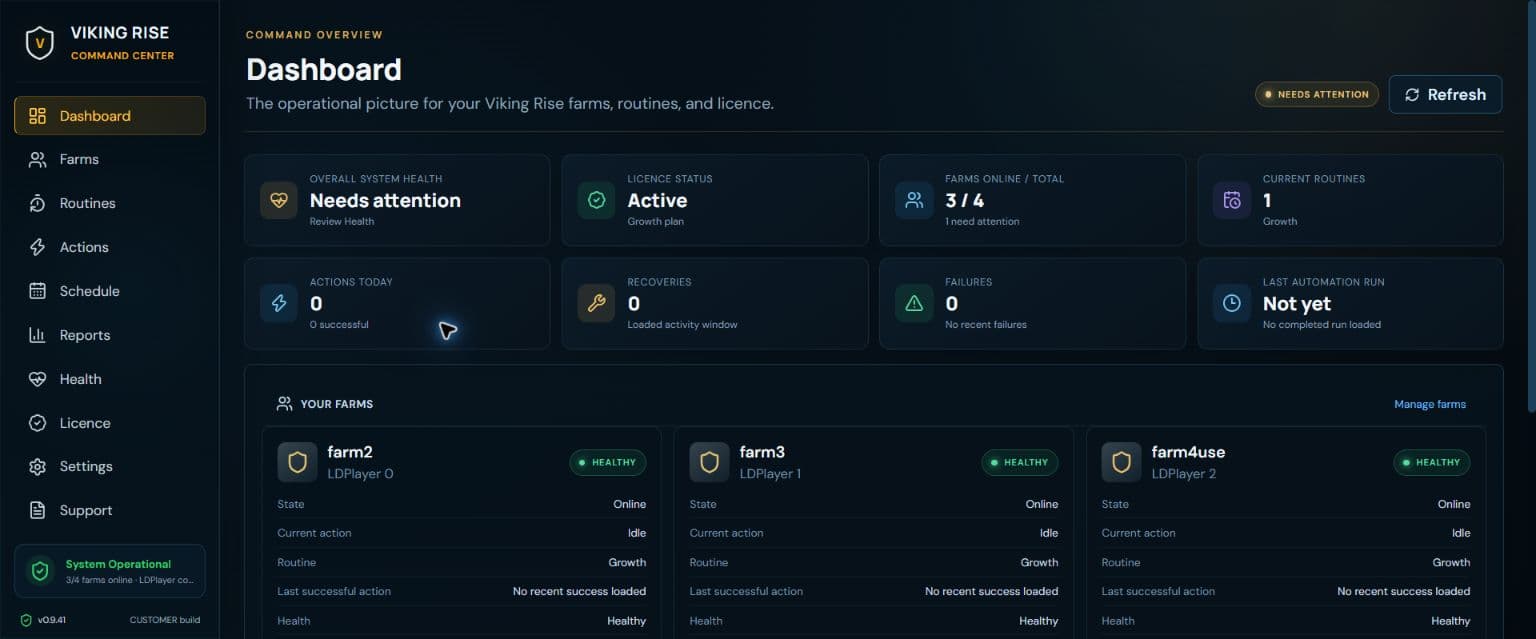
VRA is still in development and is not available to download or buy. A completely free seven-day trial is planned when access opens. Automation can conflict with game rules and can put accounts at risk; state checks and bounded retries do not guarantee flawless execution or protection from restrictions.
WANT THE FULL TASK LIST?
Explore the rewards, city, troop, resource and exploration tasks in the current development scope—and the honest limits attached to them.