Android client
Connect the Finetic Android client, discover a server, pair securely and use native mobile browsing and playback.
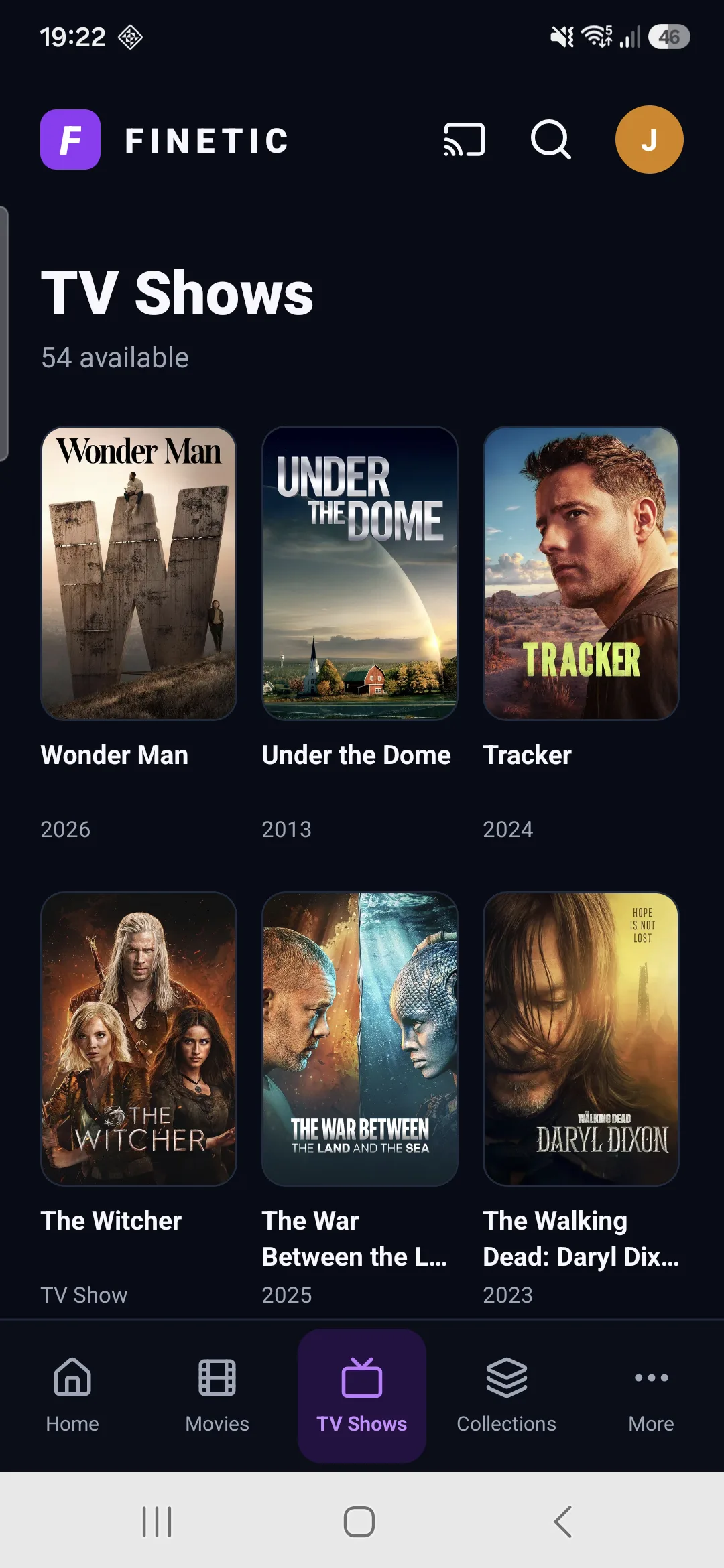 1Native safe areas2Wrapped media rails
Current status#
The Android client is in private physical-device testing. It shares contracts, authentication, media view models and playback events with the television client, but uses a mobile layout and touch interaction.
Connect#
Choose a discovered Finetic server or enter its HTTPS address. Pair through the browser approval flow. The stored device credential is installation-specific and can be revoked without changing the user's password.
Mobile layout#
The interface respects status-bar and gesture-navigation safe areas. Content and controls must not sit beneath Samsung or Android system navigation. Poster grids wrap to the screen width rather than becoming one continuous horizontal row.
Browse and playback#
Movies and shows use the server's rich artwork and metadata rather than unrelated remote placeholder art. Opening a show exposes seasons and episodes. Native playback still uses the authoritative server plan and reports a Finetic Android device identity.
Network changes#
Moving between LAN and mobile data can change the reachable server address and available bitrate. Use a stable public HTTPS hostname for remote access. Finetic does not provide a relay that bypasses your network configuration.
Debug pairing#
Wireless ADB pairing is a development tool, not the Finetic user-pairing flow. Never publish ADB pairing codes or leave wireless debugging enabled after testing.