Remote Access Setup, Verification and Monitoring
Configure and use Finetic Remote Access to verify public DNS, HTTPS, the exact server route, Direct Play seeking, HLS, WebSockets and guest sharing.
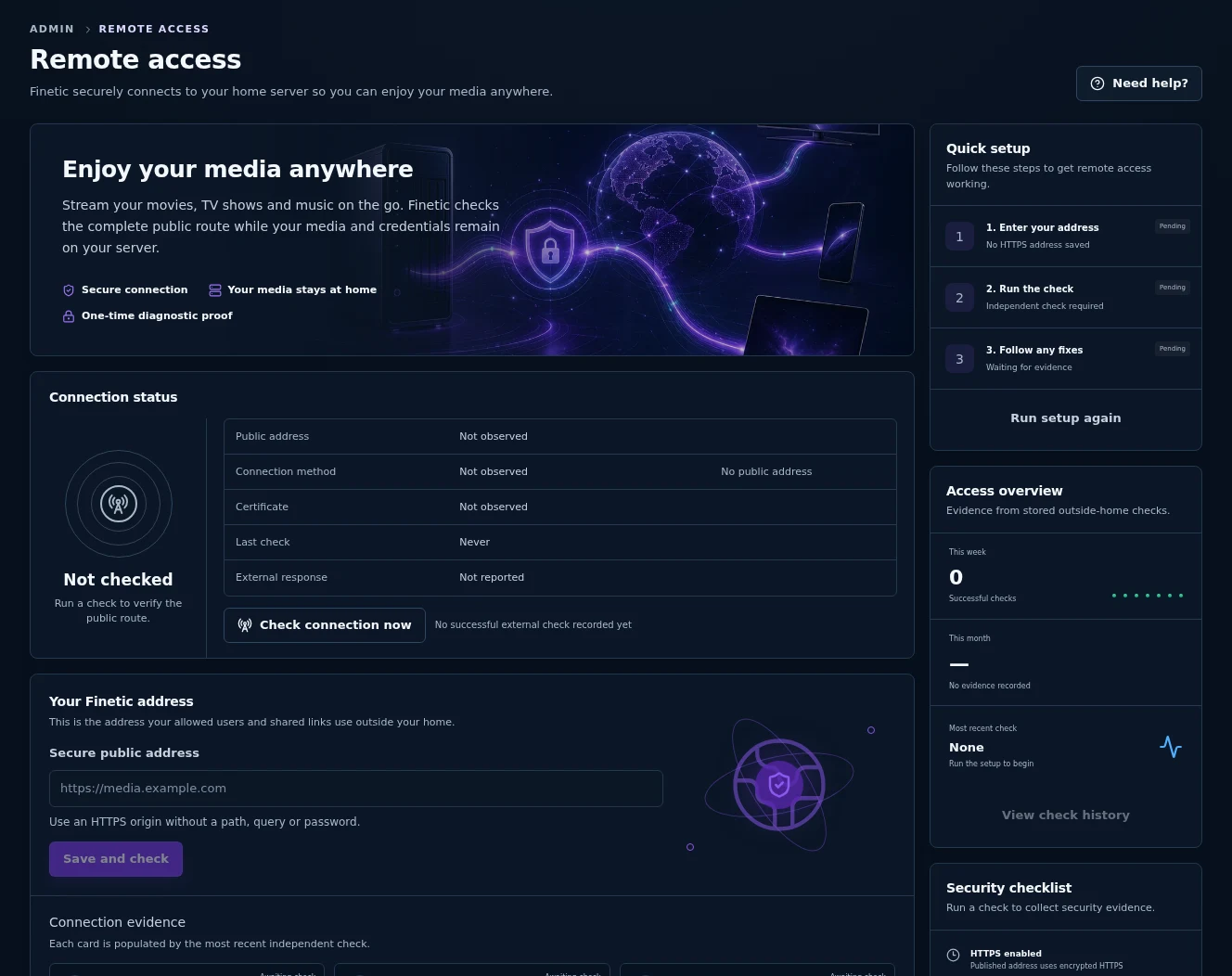 1Complete route status2Guided setup3Public HTTPS origin
Finetic's Admin → Remote Access page answers a more useful question than “does the homepage open?”: can an outside client reach the correct Finetic installation and use the request patterns required for sign-in, seeking, HLS playback, live updates and bounded guest access?
Before you begin#
You need:
- administrator access to Finetic;
- an activated Finetic installation, because the independent check is an entitled control-plane service;
- a public DNS hostname such as
media.example.com; - a trusted HTTPS certificate covering that exact hostname;
- a router, firewall or hosted ingress path that reaches your reverse proxy;
- a proxy route that forwards the complete Finetic origin without rewriting
/apior media paths.
Use an origin only:
https://media.example.com
Do not enter a private address, a path, a query string, credentials or an insecure HTTP URL.
Run the first outside-home check#
- Sign in as an administrator.
- Open Admin → Remote Access.
- Under Your Finetic address, choose Change if an address is already present.
- Enter the same HTTPS origin used by browsers, native clients and shared links outside the home.
- Choose Save and check or Check connection now.
- Leave the page open until the result appears. A full outside check can take longer than an ordinary API request because it tests several independent routes.
The quick-setup rail tracks three stages: address entered, check completed and any repair still required. A successful result includes the observed public addresses, port 443, certificate evidence, response duration and the timestamp of the check.
What Finetic verifies#
| Check | What is requested | Passing evidence | Why it matters |
|---|---|---|---|
| Public DNS | The hostname is resolved by the independent checker | Public, routable addresses | A private, loopback or unsafe target is not a usable public route. |
| HTTPS certificate | A TLS connection to the exact hostname | Trusted chain, matching hostname and certificate dates | Browsers and Finetic clients must be able to trust the route without bypasses. |
| Finetic installation | A one-time status challenge | The exact random token and challenge issued by this installation | Prevents a generic homepage or wrong upstream from being reported as Finetic. |
| Direct Play seeking | A synthetic 20-byte range | HTTP 206 and the expected Content-Range | Direct-file seeking depends on correct byte-range semantics. |
| HLS manifest | A temporary synthetic playlist | Expected playlist content and media type | The proxy must preserve manifest paths and responses. |
| HLS segment | A small synthetic segment | Expected segment response and media type | Segment delivery can fail even when the HTML interface works. |
| Live updates | A WebSocket upgrade | HTTP 101 and the expected accept value | Upgraded connections must survive the reverse proxy. |
| Guest sharing | A synthetic guest endpoint | A response explicitly stating that no media was exposed | Public guest routing is checked without creating a reusable share. |
The status, range, manifest, segment and guest routes exist only for a short-lived random probe. Finetic removes the probe after the run or after its ten-minute expiry.
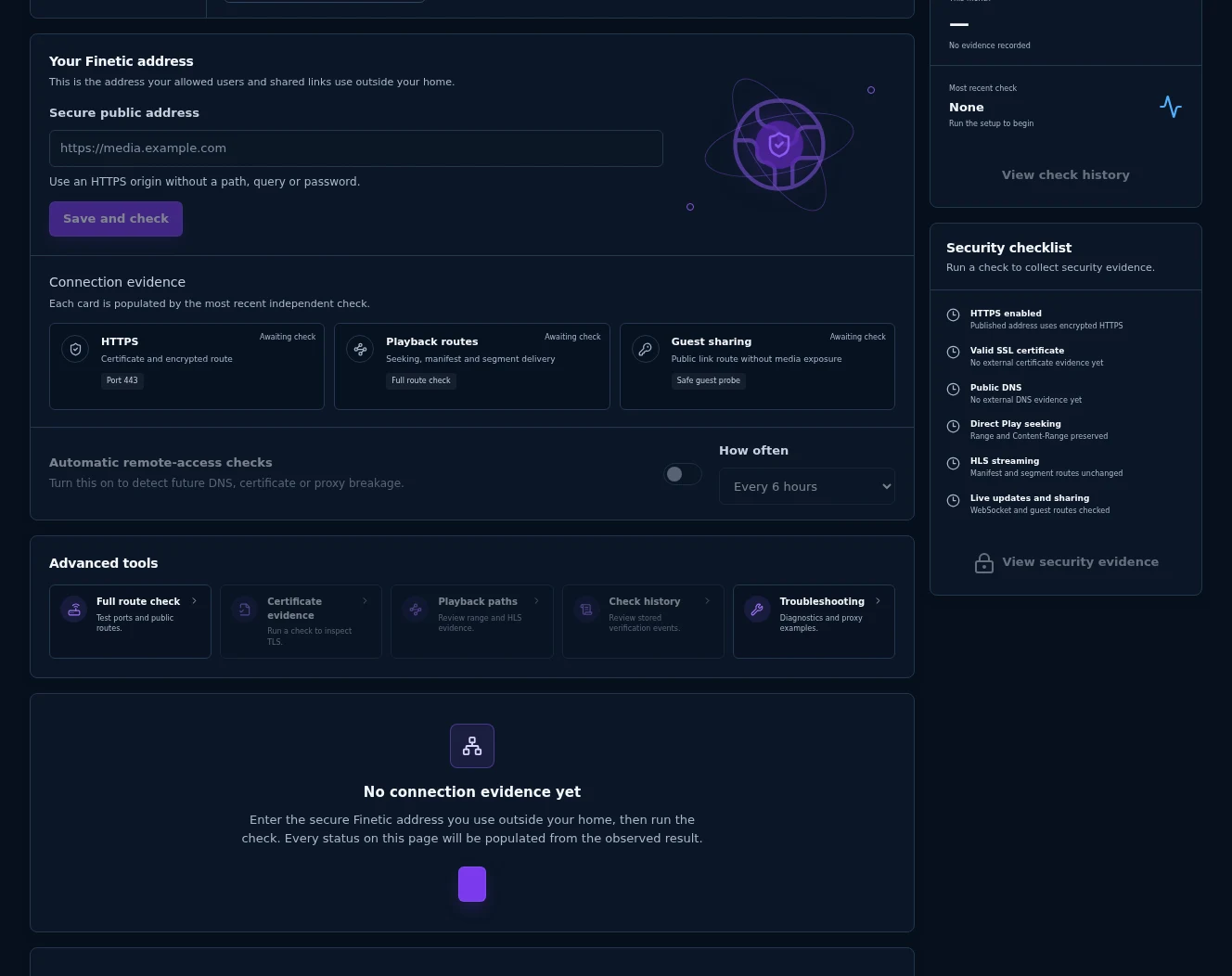
The lower workspace is also captured from the real product. It shows how unchecked evidence remains explicitly pending instead of being presented as a fabricated success.
Read the page from top to bottom#
Connection status#
The summary uses three states:
- Connected — the complete latest route passed and belongs to the currently displayed address.
- Needs attention — at least one observed check failed, or the displayed address differs from the address in the latest report.
- Not checked — no outside-home evidence exists yet.
“Needs attention” does not always mean your home connection is broken. If the local Finetic route passes but the independent checking service returns an error, Finetic labels that service separately and does not invent certificate, DNS or NAT evidence.
What needs fixing#
Finetic orders failed steps and explains the first affected layer. Apply the first repair, then run the complete check again. Later failures can be consequences of the first one.
Connection evidence#
The three overview cards group the detailed result:
- HTTPS covers the certificate and encrypted route.
- Playback routes covers Direct Play seeking, the HLS manifest and segment delivery.
- Guest sharing covers the safe public-link probe.
The expandable Verified connection evidence retains the individual category, safe endpoint, status code and duration reported by the check.
Access overview and history#
The right rail counts successful checks during the last seven and 30 days and identifies the most recent manual or automatic run. Recent check history retains up to 100 reports for this installation; the interface shows the latest ten.
Turn on automatic monitoring#
After a public address is saved:
- Enable Automatic remote-access checks.
- Choose every 1, 6, 12 or 24 hours.
- Run one manual check so the starting evidence is understood.
The scheduler runs the same complete check. If a scheduled run fails, the administrator notification centre receives Fix remote access. When a later check succeeds, Finetic records the recovery and offers View result. Automatic monitoring is disabled by default.
Troubleshoot by failing category#
| Observed failure | Likely boundary | First checks |
|---|---|---|
| DNS cannot resolve | Public DNS | Confirm the hostname, A/AAAA records and propagation. |
| Certificate validation fails | TLS | Confirm the certificate covers the exact hostname, is current and includes a complete trusted chain. |
| Connection refused or timed out | Firewall or NAT | Confirm port 443 reaches the proxy and that carrier-grade NAT or double NAT is not blocking inbound access. |
| Status endpoint returns HTTP 404 | Proxy routing | Forward every path, including /api/remote-access, to Finetic without stripping or adding a prefix. |
| Challenge does not match | Wrong application or upstream | Confirm this hostname reaches the intended Finetic installation rather than another service or cached response. |
| Range check fails | Proxy media handling | Preserve the Range request and 206, Accept-Ranges and Content-Range response headers. |
| Manifest or segment fails | HLS routing | Do not rewrite HLS paths, change media types or cache temporary diagnostic responses. |
| WebSocket upgrade fails | Proxy upgrade handling | Forward Upgrade and Connection correctly using HTTP/1.1 where the proxy requires it. |
| Outside checker fails with 5xx | Finetic diagnostic service | Wait and retry. This result alone does not prove that the public server is unreachable. |
Reverse-proxy starting points#
Nginx:
location / {
  proxy_pass http://127.0.0.1:3000;
  proxy_http_version 1.1;
  proxy_set_header Host $host;
  proxy_set_header X-Forwarded-For $proxy_add_x_forwarded_for;
  proxy_set_header X-Forwarded-Proto $scheme;
  proxy_set_header Upgrade $http_upgrade;
  proxy_set_header Connection $connection_upgrade;
  proxy_request_buffering off;
  proxy_buffering off;
  proxy_read_timeout 3600s;
}
Caddy:
media.example.com {
  reverse_proxy 127.0.0.1:3000
}
These are starting points, not replacements for existing access controls. Do not expose PostgreSQL, Docker, APISIX administration, Proxmox management or another host-management port.
Privacy and security boundary#
The independent check receives the installation identifier, configured public origin and a temporary random proof. It does not receive a media item, password, browser cookie, viewing history, source path or reusable guest link. Diagnostic responses set Cache-Control: no-store.
Public reports are stored in Finetic's PostgreSQL database. The public documentation screenshots are captures from the real Remote Access page in a controlled installation; administrator identity and host details have been sanitized.