
Finetic Direct Engine: Original-Quality Playback and Evidence
Learn how Finetic Direct Engine preserves compatible source video, reuses verified CMAF fragments, switches tracks safely and records truthful playback evidence.
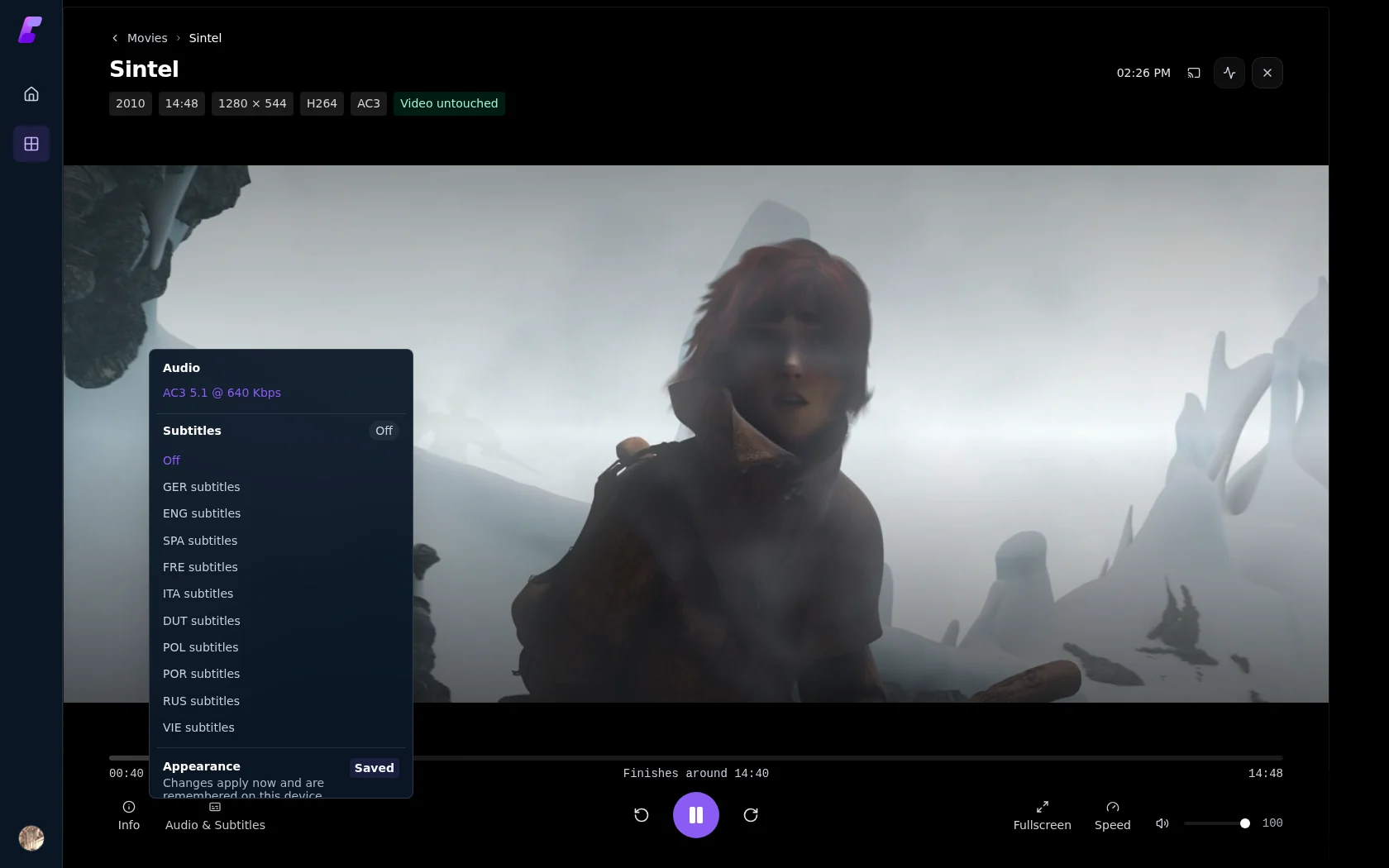 1Video remains untouched2Audio, subtitles and appearance
What changed in v0.2.7#
Finetic Direct Engine is the server-authoritative playback system in v0.2.7. Its core aim is simple: Finetic should not force media through a compatibility pipeline merely because a client integration cannot prove that the original file will work.
That does not mean blindly sending every original file. The server still decides the route. A client reports a bounded capability contract and observed outcomes; it cannot promote itself to Direct File without proving that it can honour the selected source and tracks.
Where you see it in Finetic#
| Interface | What changed |
|---|---|
| Player → Audio and subtitles | Track changes happen during playback. Subtitles visibly report Loading, Live, Rendered or Failed. |
| Player → Audio and subtitles → Appearance | Subtitle size, colour and background are available inside the player and saved for the user. |
| Player → Technical details | Video handling, audio handling, delivery method and selected tracks are reported independently. |
| Administration → Playback Evidence → Overview | Shows sessions, route attempts, first frames, established playback, unknown outcomes and failures. |
| Administration → Playback Evidence → Sessions | Shows the ordered route attempts belonging to one viewer request. |
| Administration → Playback Evidence → Routes | Compares Direct Play, remux, audio conversion, subtitle conversion and video conversion evidence. |
| Administration → Playback Evidence → Clients / Devices / Hardware | Separates exact installations, broad compatibility profiles, historical records and test evidence. |
| Administration → Playback Evidence → Rules / Profiles | Explains the narrow failure evidence currently permitted to affect later planning. |
| Administration → Jobs & Tasks → Catalogue queues → Playback preparation | Exposes bounded PlayIndex preparation instead of hiding it as unexplained background work. |
The least expensive complete route#
Finetic combines the probed source, selected edition, audio and subtitle tracks, client capabilities, user quality settings and exact retained evidence. It then chooses the least expensive route that remains valid for the complete combination.
| Route | Video | Audio | Typical use |
|---|---|---|---|
| Direct File | Original | Original | The client can open the container and honour the selected tracks. |
| Direct Stream / remux | Original | Original | Encoded streams are compatible but the presentation must change. |
| Audio conversion | Original | Converted | Video is safe but the selected audio codec or layout is not. |
| Subtitle conversion | Original where possible | Original or converted as required | Compatible text is delivered as WebVTT. |
| Full video conversion | Converted | Copied or converted | Video, HDR, quality or subtitle burn-in requires it. |
The important v0.2.7 improvement is that compatible video can stay untouched even when the container, audio or subtitle route needs work. The player and Playback Evidence page say what happened instead of describing every HLS route as a generic transcode.
PlayIndex v2#
Seeking and copied-video packaging need trustworthy random-access boundaries. PlayIndex v2 creates a bounded, source-versioned index only when a route needs it. It does not perform an unbounded keyframe analysis across every file during an ordinary scan.
The index is invalidated when the source changes. Missing, stale or impractically dense evidence retains a safer fallback rather than pretending the copied-video route is valid.
Persistent CMAF reuse#
Direct Engine stores completed, verified CMAF objects in Finetic's cache volume. A repeat play or resume can reuse an exact object when its source fingerprint, stream selection, packaging inputs and timeline match.
Cache reuse is deliberately strict:
- incomplete or mismatched objects are never published as valid;
- a source change produces a different identity;
- completed objects are immutable;
- live authorisation is still checked before an object is served;
- stopping a session or revoking a device credential invalidates the media capability even when the cached bytes remain reusable for a future authorised session;
- cache maintenance remains bounded by the configured storage policy.
This can reduce repeat startup work and FFmpeg launches. It is not a promise that every file will be cached or that every playback route avoids FFmpeg.
Separated audio and video#
For compatible browser routes, Finetic can package video and audio as separate CMAF representations. The same verified video objects can then be paired with the selected audio representation without regenerating the video.
This is particularly useful when video is compatible but AC-3, E-AC-3, DTS or another selected audio stream needs conversion. The server can preserve the original picture while producing client-safe audio.
Live subtitle activation#
Compatible text subtitles can be selected while video continues playing. The player exposes the activation state:
- Loading means the selected track is being prepared or loaded;
- Live means timed cues are being rendered;
- Rendered means the subtitle is burned into the video because faithful client-side rendering is unavailable;
- Failed means the selected track did not activate and the diagnostic contains the failure.
SRT and other supported embedded text can be extracted and cached as WebVTT. Styled ASS and image-based PGS may still require video conversion when a client cannot render them faithfully. The player identifies that consequence before selection.
Evidence-led recovery#
A viewer's request is one playback session. Every concrete route tried inside it is a separate attempt. If Direct Play fails and remux succeeds, Finetic retains both facts; it does not rewrite the session as though Direct Play worked.
Only a high-confidence component failure can create a narrow fallback. Network loss, unavailable storage, an authentication failure, a server packaging error, a closed browser tab or missing telemetry cannot become a decoder rule.
Rules are scoped to the relevant source, route, component, client and software epoch. Replacing the media or changing the client playback stack prevents stale evidence silently controlling a materially different setup.
Existing Fire TV compatibility#
The v0.2.7 server remains compatible with the currently published Finetic for Fire TV v0.1.15. Existing clients omit the new local-track capability and continue receiving conservative supported routes. They are not required to update before the server does.
A newer native client may retain Direct File with a non-default audio track only after it advertises the versioned local-selection contract, reports the available tracks and confirms which track actually became active. Missing or ambiguous confirmation keeps the conservative server route.
Default-on with kill switches#
The supported v0.2.7 Docker image enables verified Direct Engine components by default. Operators retain explicit environment-variable kill switches:
FINETIC_NATIVE_CMAF_SHADOW_ENABLED=true
FINETIC_NATIVE_CMAF_READ_ENABLED=true
FINETIC_NATIVE_SEPARATED_CMAF_ENABLED=true
FINETIC_LOCAL_TRACK_DIRECT_ENABLED=true
Set an individual value to false only when isolating a reproducible problem. Record the affected title, client, selected tracks, plan reason codes and copied diagnostic before changing the route. A kill switch is a rollback boundary, not a normal tuning control.
v0.2.7 release evidence#
The final release gate recorded 651 of 651 automated tests and 20 of 20 compiled-Chromium playback and concurrency scenarios passing. The deterministic media set exercised Direct File, audio-only conversion, separated CMAF, HEVC SDR and HDR fallback, interlaced video with measured A/V drift, text and styled subtitles, multiple audio tracks, sparse and dense keyframes, seeking, next-episode handover and simultaneous playback attempts.
The browser gate reported no failed media response or console error in those scenarios. Sequential Direct Play had a 303 ms median first-frame time and 187 ms median seek time on the hosted release runner; those are scoped measurements, not universal network or device promises. Exact immutable-image, platform, provenance and SBOM identities are published in the v0.2.7 release record.
What this release does not claim#
Direct Engine improves the route model, cache reuse, track handling and evidence contract. It does not establish universal compatibility with every codec, television, browser, GPU, subtitle font or network. Physical-device checks still matter for HDR appearance, surround layout, remote-control behaviour and display-specific decoder limits.
Use Playback planning for the complete decision model, Audio, subtitles, quality and HDR for track behaviour, and Playback troubleshooting when a route produces an unexpected result.